Parked Domains and Dead Websites: What They Mean and How to Check
What a parked domain means, how it differs from a dead website, how to check either in under a minute, and why both often make better sales leads.
- Updated
- Reading time
- 8 min
On this page
The short answer
A parked domain is registered but not connected to a real website, usually showing a "this domain is for sale" or ad page. A dead website is one that no longer loads: the domain doesn’t resolve, the server refuses or times out, or it returns a server error. When a local business still links to either one, customers hit a dead end, and that makes the business a strong lead.
What is a parked domain?
A parked domain is a domain name that someone has registered but not connected to a real website or email service. Visit one and you’ll typically see one of three things:
- a registrar’s holding page (“this domain was recently registered at…”);
- a marketplace listing (“this domain is for sale”, “buy this domain”);
- a page of pay-per-click ads related to the domain’s words.
Parking itself is normal. People reserve names for future projects, and investors hold names to resell. It matters for lead finding when a business’s listing still points at a parked domain. That usually means the business let its domain expire and someone else registered it, often to resell. Every customer who taps “Website” on their listing lands on a for-sale page.
What is a dead website?
A dead website is one that doesn’t load at all. The common causes, from most to least final:
- The domain doesn’t resolve. DNS returns nothing, usually because the registration lapsed or the DNS records were removed.
- The connection fails. The domain resolves but nothing is listening, often because the hosting was cancelled.
- It times out. The server accepts the request but never answers.
- It returns a server error (HTTP 5xx), such as a crashed site or a broken hosting account.
- It redirects in a loop or to an invalid address.
A page that returns 404 Not Found is technically a working server, so treat it as broken, not dead. It’s still worth a look by hand.
Parked vs. dead vs. no website
| No website | Dead website | Parked domain | |
|---|---|---|---|
| URL on the listing | None | Yes, doesn’t load | Yes, loads a placeholder or sale page |
| Did they have a site before? | Usually not | Yes | Often yes; domain lapsed |
| What customers see | Directory pages only | An error | Someone else’s ads or a price tag |
| Your opening line | “You don’t have a site yet” | “Your site is down” | “Your old domain is for sale” |
Dead and parked businesses have already shown they value a website: they paid for one. That makes the conversation easier than convincing someone who never had one.
How to check if a website is dead or parked (in under a minute)
Open the URL in a private browser window first. If you want to be precise, or you’re checking more than a handful, three terminal commands tell you exactly what’s going on:
# 1. Does the domain still resolve?
nslookup smithplumbing.com

# 2. What does the server answer? (status code + redirects)
curl -sIL --max-time 8 https://smithplumbing.com | grep -iE "^HTTP|^location"

# 3. Is it a for-sale page? Look for registrar parking text.
curl -sL --max-time 8 https://smithplumbing.com | grep -ioE "domain (is )?for sale|buy this domain|sedoparking|hugedomains|afternic"- No address from
nslookupmeans the domain doesn’t resolve, so the site is dead. - A connection error, a timeout or a
5xxstatus means the site is dead, at least for now. - A
200with registrar or marketplace text in the page means the domain is parked.
To see who holds a parked domain, and since when, look it up with RDAP. Our RDAP guide shows how, with no key needed.
Avoiding false positives
Before telling an owner their site is down, rule out the usual false alarms:
- Temporary outages. Retry later the same day. A real dead site stays dead.
- A new site on a different domain. Search the business name; they may have moved and never updated their listing. That’s still a useful thing to tell them, but it’s a different pitch.
- Bot protection. Some hosts block command-line requests. If the browser loads it, it’s alive.
Checking hundreds of business websites automatically
PresenceZero runs these checks on every business in a scan. It labels each listed site none, dead, parked or alive and records the exact reason, such as “DNS lookup failed”, “Returned HTTP 503” or “Matched a registrar for-sale page”. Hover the badge to see it, so you can check every verdict yourself. Sites that fail for transient reasons get one automatic retry before they’re marked.
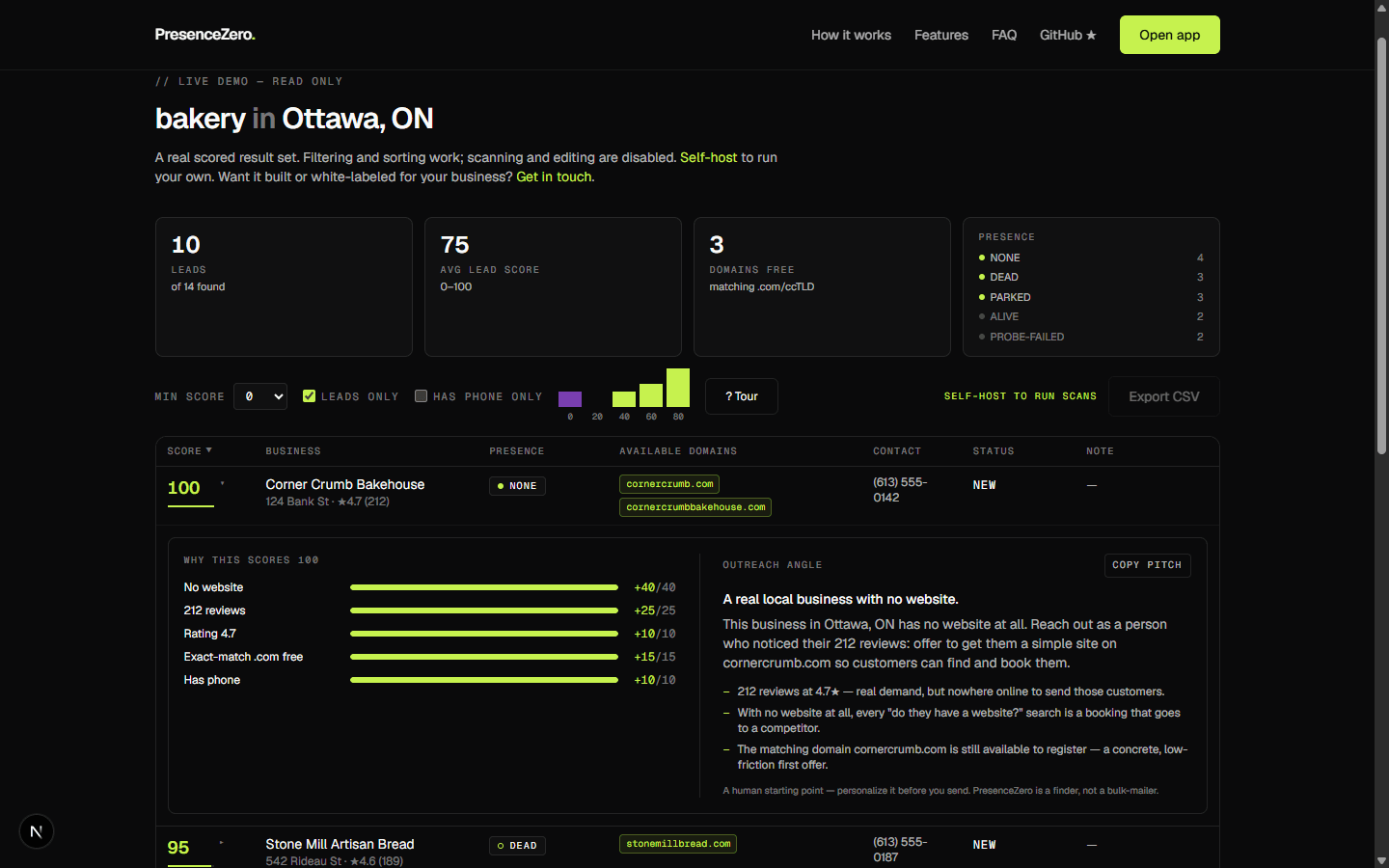
The probe is hardened for safety: it only fetches public http(s) addresses, follows each redirect manually, and refuses anything that resolves to a private or internal network address. Try it on sample data in the live demo.
How to pitch a business with a dead or parked website
Lead with the customer’s experience, not the technology: “When people tap Website on your Google listing, they land on a page selling your old domain.” It’s specific, easy to verify, and not a criticism of the owner.
Then offer the fix: a new site on a domain they own (if the old one is for sale, tell them the price honestly, and suggest a good alternative that’s still free), plus updating their listing. More scripts are in how to sell websites to local businesses.
Frequently asked questions
What does it mean when a domain is parked?
It is registered but not connected to a real website or email. Visitors see a placeholder, an ad page, or a "domain for sale" listing instead of a business site.
Is a parked domain available to buy?
Not to register. Someone already owns it. Some parked domains are listed for sale on marketplaces at a price the owner sets. A domain availability check (RDAP or your registrar) tells you whether it is registered.
How can I tell if a website is down for everyone or just me?
Try it from a different network (for example, mobile data), use a command-line check like curl from another machine, or retry later. If DNS doesn’t resolve or the server keeps returning errors from several places, it’s down for everyone.
Written by Tahir Nazir
Tahir builds websites and AI call receptionists for local businesses, and wrote PresenceZero to find his own leads. These guides are the playbook he uses with it.